
Flograte

API Integration Solution for Phoenix Labs

Client Overview

Client Name: Phoenix Labs
Industry: Construction Project Management
Solution: Custom Building Construction Project Management Solution

Problem Statement

Phoenix Labs, a leading provider of custom building construction project management solutions, faced a significant challenge. Their existing solution lacked the capability to expose its functionality through APIs, which limited their ability to integrate with other systems and provide seamless access to their services. They sought to expose these APIs through the Azure API Management portal to enhance interoperability, scalability, and security.

Objectives

API Exposure

Develop and expose APIs for the existing
project management solution.

Integration

Utilize Azure API Management to manage
and secure the APIs.
Scalability

Ensure the solution can handle increased
load and usage.

Security

Implement robust security measures
to protect the APIs.
Solution

To address Phoenix Labs’ needs, the following steps were undertaken:

1. API Development:

  • Identified key functionalities of the project management solution that needed to be exposed as APIs.
  • Developed RESTful APIs to expose these functionalities.
  • Ensured APIs followed best practices for design and implementation.
  •  

2. Azure API Management Integration:

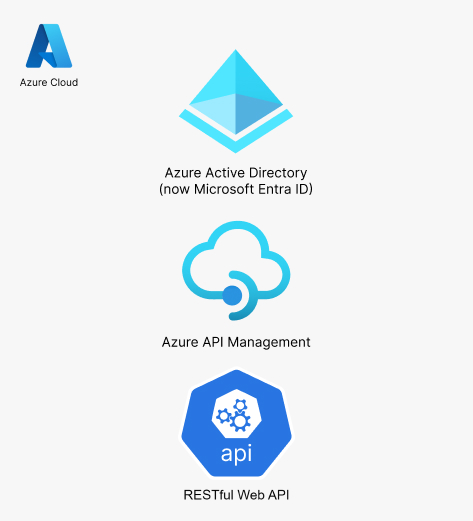
  • Set up Azure API Management service.
  • Imported the newly developed APIs into the Azure API Management portal.
  • Configured policies for rate limiting, caching, and logging to optimize performance and security.
  • Implemented authentication and authorization mechanisms using Azure Active Directory (now Microsoft Entra ID).
  •  

3. Testing and Deployment:

  • Conducted thorough testing to ensure APIs functioned correctly and met performance requirements.
  • Deployed the APIs and Azure API Management configuration to the production environment.
  • Monitored the APIs for performance and security issues post-deployment.
    •  

Results

  • Enhanced Integration: Phoenix Labs’ project management solution can now seamlessly integrate with other systems, improving overall efficiency.
  • Improved Scalability: The solution can handle increased usage without performance degradation.
  • Robust Security: APIs are protected with industry-standard security measures, ensuring data integrity and confidentiality.

Conclusion


The integration of Phoenix Labs’ project management solution with Azure API Management has significantly enhanced their ability to provide robust, scalable, and secure APIs. This has enabled better integration with other systems, improved scalability, and ensured data security, ultimately leading to increased client satisfaction and operational efficiency.

Get Insights

Why Your Business Needs Enterprise Application Integration in 2025

In today’s fast-paced digital world, businesses rely on multiple software applications to manage operations, customer

Choosing Right Mobile App Development Company in 2025

In today’s digital world, mobile apps have become a necessity rather than a luxury. They

Extend Odoo’s Functionality with Custom Integrations

Odoo is well-known as one of the most adaptable open-source ERP solutions on the market

FHIR and AI for Healthcare Automation in 2025

Introduction to FHIR and AI in Healthcare In the constantly changing world of healthcare technology,

In the modern business landscape, software solutions have become critical for operational efficiency, productivity, and growth. The digital transformation is driving businesses to adopt various software technologies that cater to their needs, whether through off-the-shelf software or custom-built solutions. Importance of ROI in Software Selection Return on Investment (ROI) is an essential metric for evaluating software solutions. In today’s competitive market, businesses must ensure that their software investments not only meet their immediate needs but also provide long-term value. When choosing between Software as a Service (SaaS) or custom software, understanding how each impacts ROI is crucial for making an informed decision. 2. Understanding SaaS (Software as a Service) What is SaaS? SaaS is a cloud-based software delivery model where applications are hosted and maintained by third-party providers. Businesses access these applications via the internet, typically through a subscription model. Key Features of SaaS Cloud-based accessibility: Users can access the software anywhere, anytime, via an internet connection. Subscription-based pricing: Businesses pay a recurring fee for using the service, rather than purchasing it outright. Automatic updates: Providers handle software updates, ensuring businesses have access to the latest features and security patches. Scalability: SaaS applications can scale to accommodate growth without requiring significant infrastructure changes. Common Examples of SaaS Solutions Google Workspace for collaboration Salesforce for customer relationship management Shopify for e-commerce Slack for team communication 3. Understanding Custom Software What is Custom Software? Custom software refers to applications specifically designed and developed to meet the unique needs of a particular business or organization. Unlike SaaS, custom software is tailored to match the exact requirements of the business’s processes, workflows, and goals. Key Features of Custom Software Tailored functionality: Custom software is built to meet the specific needs of the business. Ownership and control: Businesses own the software, providing more control over features and security. Long-term investment: Although initially more costly, custom software can offer long-term benefits through increased efficiency and uniqueness. Examples of Businesses Using Custom Solutions Netflix: Custom-built platforms for streaming content and user management. Uber: Tailored mobile apps and backend systems for seamless ride-sharing operations. Amazon: Custom logistics and e-commerce systems for handling massive transaction volumes. 4. Cost Comparison: SaaS vs. Custom Software Initial Investment and Setup Costs SaaS: Lower upfront costs as businesses only pay for the subscription. Custom software: Higher initial development costs due to the need for specialized developers and infrastructure. Subscription vs. One-Time Payment SaaS: Ongoing subscription costs, which can accumulate over time. Custom software: One-time development payment, but ongoing maintenance costs. Maintenance and Upgrade Expenses SaaS: Maintenance is handled by the provider, but businesses are still required to pay for new features or services. Custom software: Businesses bear the responsibility for software updates and ongoing maintenance costs. 5. Implementation Time and Ease of Use SaaS: Quick Setup and Minimal Downtime SaaS applications are typically ready to use immediately, with minimal setup. This is ideal for businesses looking to minimize downtime during implementation. Custom Software: Development Time and Complexity Custom software requires a longer development cycle, as it must be tailored to the specific needs of the business. This can lead to longer wait times before the software is fully functional. 6. Customization and Scalability SaaS: Limited Customization but Scalable While SaaS solutions are often standardized, many offer customization options such as integrations with other platforms. Scalability is built into SaaS solutions, making them ideal for businesses that expect to grow quickly. Custom Software: Fully Tailored to Business Needs Custom software offers full flexibility in terms of design, functionality, and features. It can be built to match the exact needs of the business and scaled as the business grows. 7. Security and Data Control SaaS: Cloud-Based Security Risks SaaS providers handle security but businesses must trust the provider's ability to protect data. Security risks, such as data breaches, are a concern when using third-party cloud services. Custom Software: Full Control Over Security Measures With custom software, businesses have complete control over security protocols and data management, which can mitigate potential risks. 8. Performance and Integration SaaS: Standardized Performance and Third-Party Integrations SaaS solutions generally offer standardized performance across users. Integrating with third-party tools is possible but may be limited based on the provider’s API capabilities. Custom Software: Optimized for Specific Business Operations Custom software is built with specific business needs in mind, allowing it to be optimized for superior performance and seamless integration with internal systems. 9. Maintenance and Support SaaS: Vendor-Provided Updates and Support SaaS providers typically offer 24/7 support and handle all updates and bug fixes, ensuring minimal effort on the business’s part for troubleshooting. Custom Software: Internal or Third-Party Maintenance Required Custom software requires businesses to either manage internal teams for maintenance or outsource to third-party services, which may incur additional costs. 10. Flexibility and Future-Proofing SaaS: Adapting to Industry Changes SaaS providers regularly update their platforms to keep up with industry trends. While adaptable, businesses are dependent on the provider’s ability to respond to future changes. Custom Software: Long-Term Adaptability and Updates Custom software offers greater flexibility for adapting to changing business needs. However, it requires a proactive approach to ensure updates align with business growth and evolving technology. 11. ROI Calculation for SaaS vs. Custom Software Factors Affecting ROI Implementation speed: SaaS often has quicker implementation, leading to faster ROI. Maintenance costs: Custom software may involve higher maintenance but can provide long-term savings by removing subscription fees. Scalability: SaaS provides scalable solutions with predictable costs, while custom software scales based on the business’s individual needs. Industry-Specific ROI Considerations Small businesses: SaaS may offer a faster return on investment due to lower upfront costs. Large enterprises: Custom software may provide more long-term ROI as it can be optimized for specific, large-scale business operations. 12. Case Studies: Real-World Examples Successful SaaS Implementations Slack: Revolutionized communication for businesses by offering a user-friendly, scalable solution that integrates with a variety of tools. Dropbox: Enabled businesses to store and share data with seamless accessibility, increasing productivity and collaboration. Custom Software Success Stories Tesla: Uses custom software to manage and analyze vast amounts of data from their vehicles, enhancing product development and user experience. Airbnb: Custom software allows Airbnb to optimize property listings, payments, and customer experiences across the globe. 13. Key Considerations Before Choosing Business Size and Needs Small businesses may benefit more from SaaS due to its low cost and quick implementation. Larger enterprises with more complex needs might prefer custom software for its flexibility and scalability. Budget and Growth Plans Consider long-term budget plans. SaaS may be more affordable initially, but custom software can provide better ROI if the business has specific needs that evolve over time. Long-Term Vision Businesses with ambitious plans for growth or unique requirements should consider custom software for greater adaptability in the future. 14. Future Trends in Business Software AI and Automation in SaaS The integration of AI and automation into SaaS solutions is increasing, enhancing efficiency and data analysis capabilities for businesses. Custom Software Innovations As businesses seek more personalized experiences, custom software solutions are incorporating advanced technologies like machine learning and blockchain to offer more sophisticated functionalities. 15. Conclusion: Which One Offers Better ROI in 2025? Summary of Key Points SaaS solutions provide cost-effective, quick-to-deploy options with minimal maintenance needs, making them ideal for small and growing businesses. On the other hand, custom software offers unparalleled customization and long-term scalability, making it a powerful investment for larger businesses with specific needs. Final Recommendations In 2025, the choice between SaaS and custom software ultimately depends on your business’s size, goals, and budget. If you need flexibility and have specific, evolving requirements, custom software might offer better ROI. For businesses seeking speed, cost-effectiveness, and scalability, SaaS remains a solid option for immediate and ongoing benefits.

In the modern business landscape, software solutions have become critical for operational efficiency, productivity, and

Business Process Automation: How It Drives Growth and Maximizes Efficiency

In today’s fast-paced business environment, organizations are always on the lookout for opportunities to enhance